

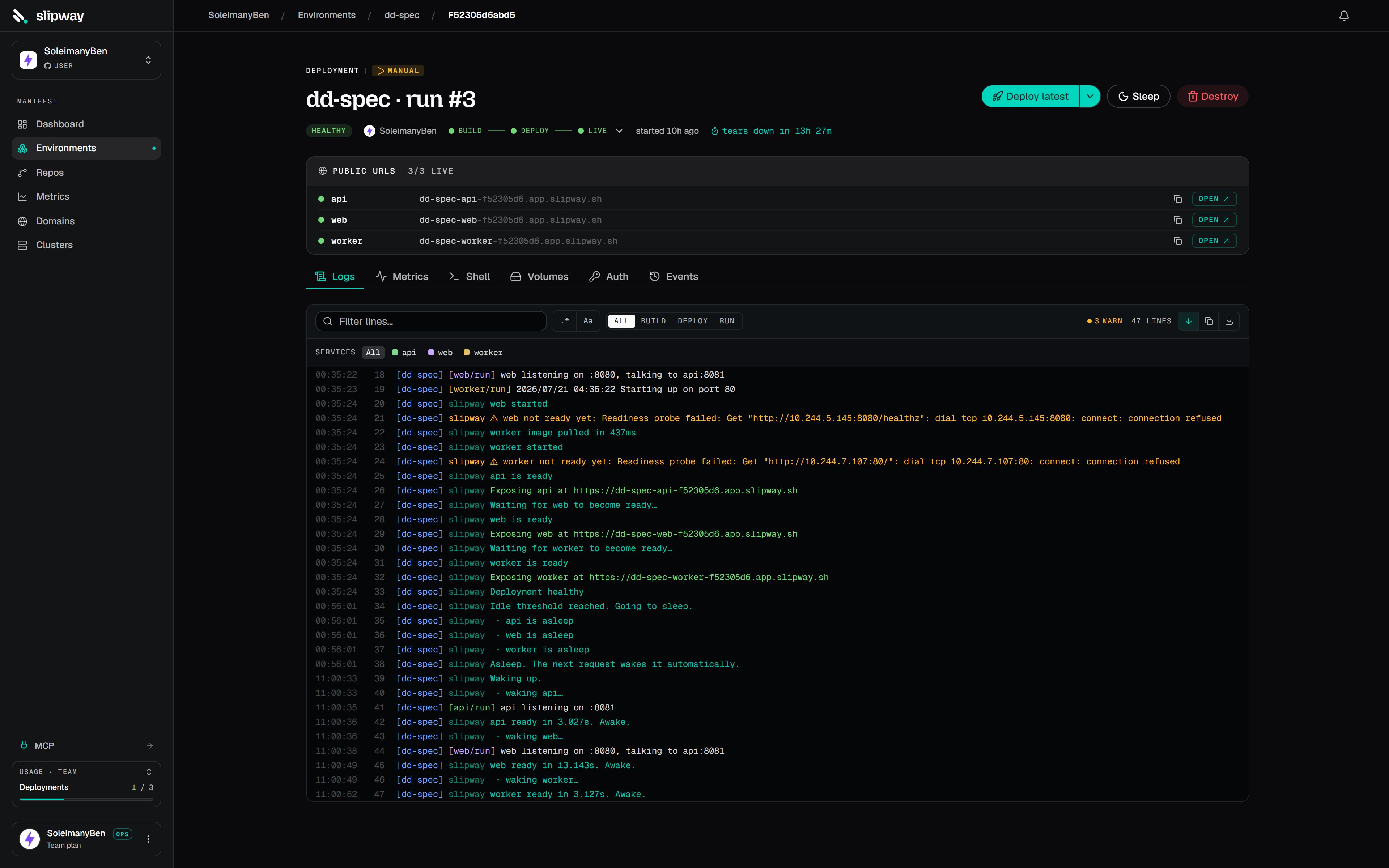
The deployment page: phase ladder up top, per-service progress below, the live URL on the right.
Lifecycle
healthy, a deployment ends in one of:
See Statuses & events for the full enum.
Triggers
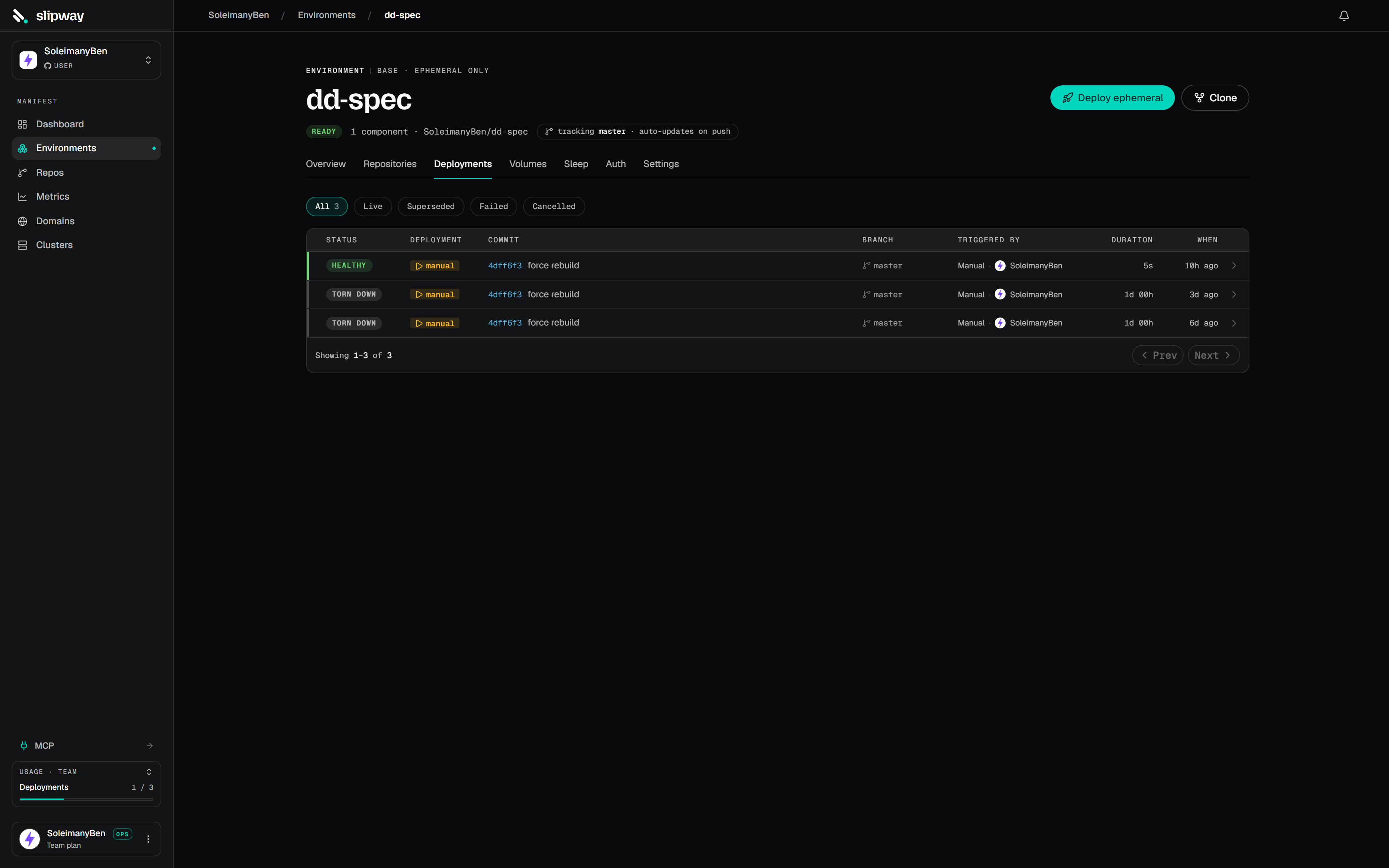
The deployments list records what triggered each deployment — push, pull request, or manual.
Every row in an environment’s deploy history shows a Triggered by column naming who caused it, with their avatar: the person who pushed, the author of the pull request, or whoever clicked deploy. Pull-request rows link the
#<number> chip straight to the PR, and each row shows the branch it deployed.
Auto-deploy on push
A repo you enable gets a managed environment that’s auto-deploy on by default — a push to the tracked branch rebuilds it in place (“git push deploys”), cancelling any in-flight deploy for the same branch so your latest commit wins. In a multi-repo environment the components default to off (deliberate), so a push leaves the deploy pinned at the commit you deployed; turn on Auto-deploy on push per component (environment → Settings → General). The environment header shows an auto-updates on push / pinned chip so you can always see which behavior you’re getting.Pull-request previews
A PR gets a stable hostname (<env-name>-<service>-<id>.<apps-base>) that stays the same across commits, so reviewers’ links never break — traffic cuts over to the newest build the instant it’s healthy. Slipway posts (and updates) the live URL as a PR comment. Closing the PR tears down every deployment for it. PR previews always run, regardless of the push setting.
Manual deploys
From a repo or environment page:- Deploy — deploy the watched branch’s latest commit (or an older commit on it). Persistent and pinned: it stays up until you redeploy or tear it down. Manual deploys are scoped to the default branch.
- Redeploy — re-run the build and deploy at the currently-deployed commit, on the same stable URL. Use it to pick up a changed base image or secret, or retry a transient failure.
- Deploy now — spin up a fresh, disposable instance at the latest commit with its own URL and TTL. The TTL clock starts at
healthy, so a slow build doesn’t eat your window.
sw dev up (a dev instance). Each gets its own isolated instance and URL.
Build caching
Builds are content-addressed: the image tag is derived from the commit plus a hash of the build inputs (context, dockerfile, target, args). If an earlier deploy on the same commit produced the same inputs, slipway skips the build and reuses the cached image — so pushing a typo fix to a PR is cheap when it doesn’t touch build inputs.
When a build does run, it reuses the layer cache from the previous build of that service, so only the layers you changed are rebuilt. That cache is shared per repository, not per environment: a pull-request preview inherits the warm cache from your main environment, which is why a preview’s first build is fast rather than starting from zero.
Rebuilding without the cache
Sometimes you want a genuinely clean build — a base image moved under a floating tag, or a build looks stale in a way you can’t explain. On an environment, open the dropdown beside Deploy latest and choose Rebuild without cache. That runs every build step again and ignores the image slipway already has for the current commit. Both parts matter: without the second, slipway would see a finished image for that commit and skip the build entirely, so nothing would change.In an environment with several repositories, the dialog lets you pick which ones to rebuild. Cold-building every repo when only one is misbehaving costs minutes for nothing, so choose the one you’re actually chasing.
Cutover & supersession
For a public service, slipway waits for readiness, makes the URL live, and emits acutover event. When a newer build for the same branch reaches healthy, the previous one flips to superseded — the hostname is stable, so traffic hands over without anyone updating a link.
Teardown
A live deployment has a Tear down action. For a long-lived environment component it reclaims just that component (siblings untouched); for a preview or dev instance it tears the whole instance down. The deployment row stays in history assuperseded.
Slipway also tears down automatically when a PR closes, when a newer deploy supersedes a branch, or when an ephemeral TTL expires (a gc event records it). If the platform restarts mid-deploy, that deployment is marked failed — redeploy it from its page.