

Logs
Every line your containers write to stdout and stderr is captured and kept for 30 days. slipway narrates its own deploy steps into the same stream, so the log carries the whole story rather than only your app’s output. The Logs tab is where a deploy is watched. Every deploy action lands there, the phase ladder in the service header walks Build, Deploy and Live, and the log below streams the run as it happens. Opening a past run from the service’s Events opens the same tab pinned to that run, with a notice above the log and the run’s own event row, so an older build’s replay is never mistaken for live output.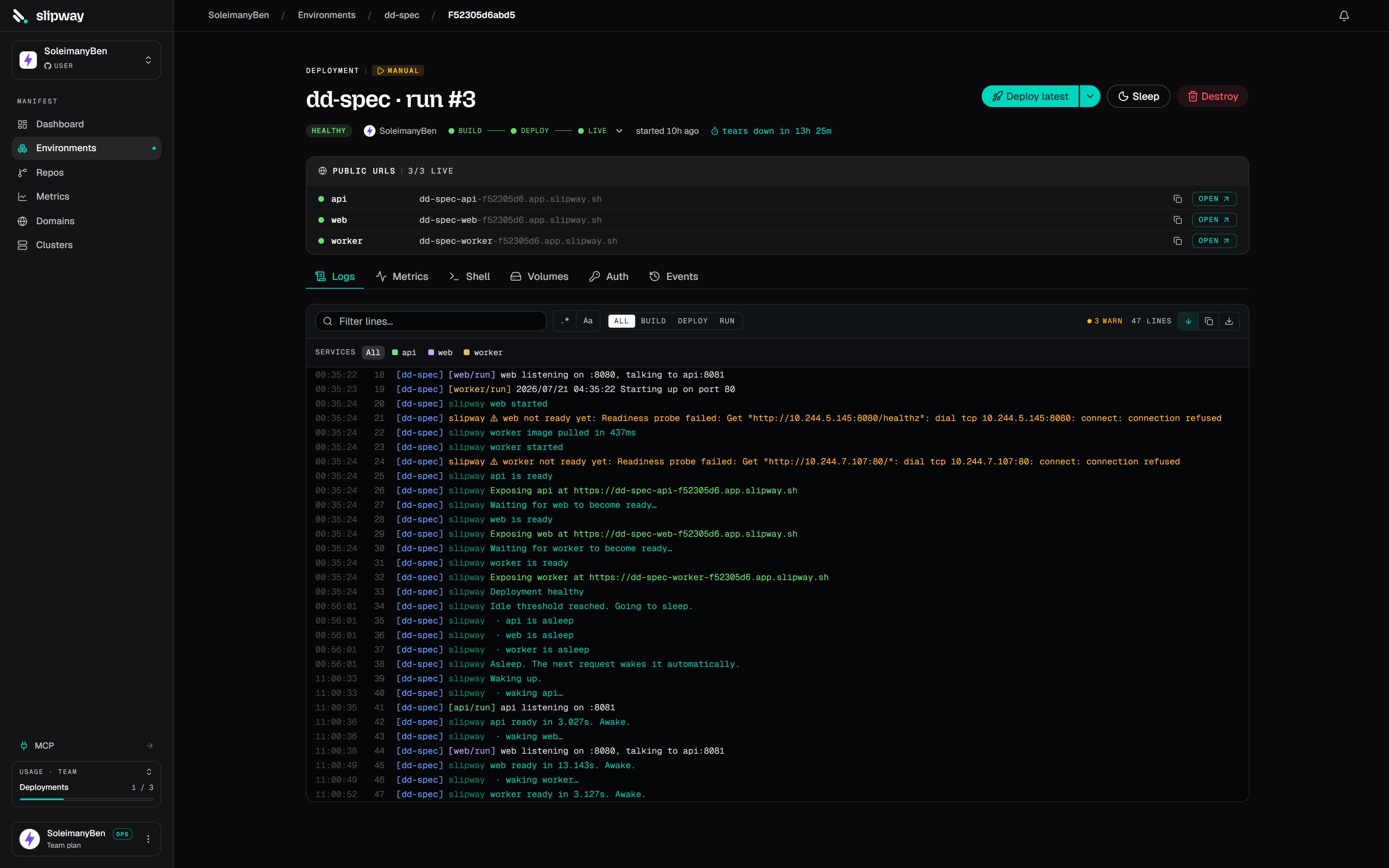
slipway's step narration interleaved with build and container output. The phase filter and the per-service filter are on the control strip above.
Filter by phase to jump to the stage you care about.
You can also narrow to a single service, hide slipway’s narration when you want only your
containers’ output, and search with optional regex and case-sensitive toggles. Copy the
visible lines, or download the full buffer as a
.log file.
Opening the tab mid-deploy gives you the last few minutes immediately.
For every lifecycle status and event kind, see
Statuses and events.
Timeline
The Timeline tab draws every state the deployment’s services have been in on one horizontal time axis: one row per service, grouped by repository, with a project-level band on top. Coloured spans show queued, building (with cache hits visible), deploying, healthy, sleeping and waking, and any crashed stretches. Markers flag failures, cancellations, cutover and teardown. Hover a span for its duration, the commit and trigger behind it, and why it ended. Scroll to zoom, drag to pan, double-click to reset, and switch the range between the last hour, day, week, or the whole life of the project. Unlike logs and metrics, the timeline is built from durable deploy records, so it keeps the full history. A crash loop from two months ago is still there.Shell
When a service is healthy, the Shell tab opens an interactive terminal into its container, with nokubectl and no kubeconfig.
The Service dropdown switches which container you are attached to, and Reconnect
starts a fresh session on the same one. New tab opens a dedicated terminal window
alongside your logs.
It is a real PTY, so arrow keys, tab completion, full-screen programs such as top and
vim, colour and resize all work.
Every session is recorded in the organization’s activity log with the user, service and
deployment.
From the CLI,
slipway exec and slipway ssh reach the same containers. See
the CLI. To reach the same shell from a standard SSH client — for
one-off commands, scp, or editor remote-SSH — see SSH access.