> ## Documentation Index
> Fetch the complete documentation index at: https://docs.slipway.sh/llms.txt
> Use this file to discover all available pages before exploring further.
# Plans & pricing
> What changes between plans, and how to find the limits that apply to your org.
Your slipway org runs on a plan. The plan controls default resource limits for every deployment, retention windows, how many preview environments you can run at once, and which features are available to your team.
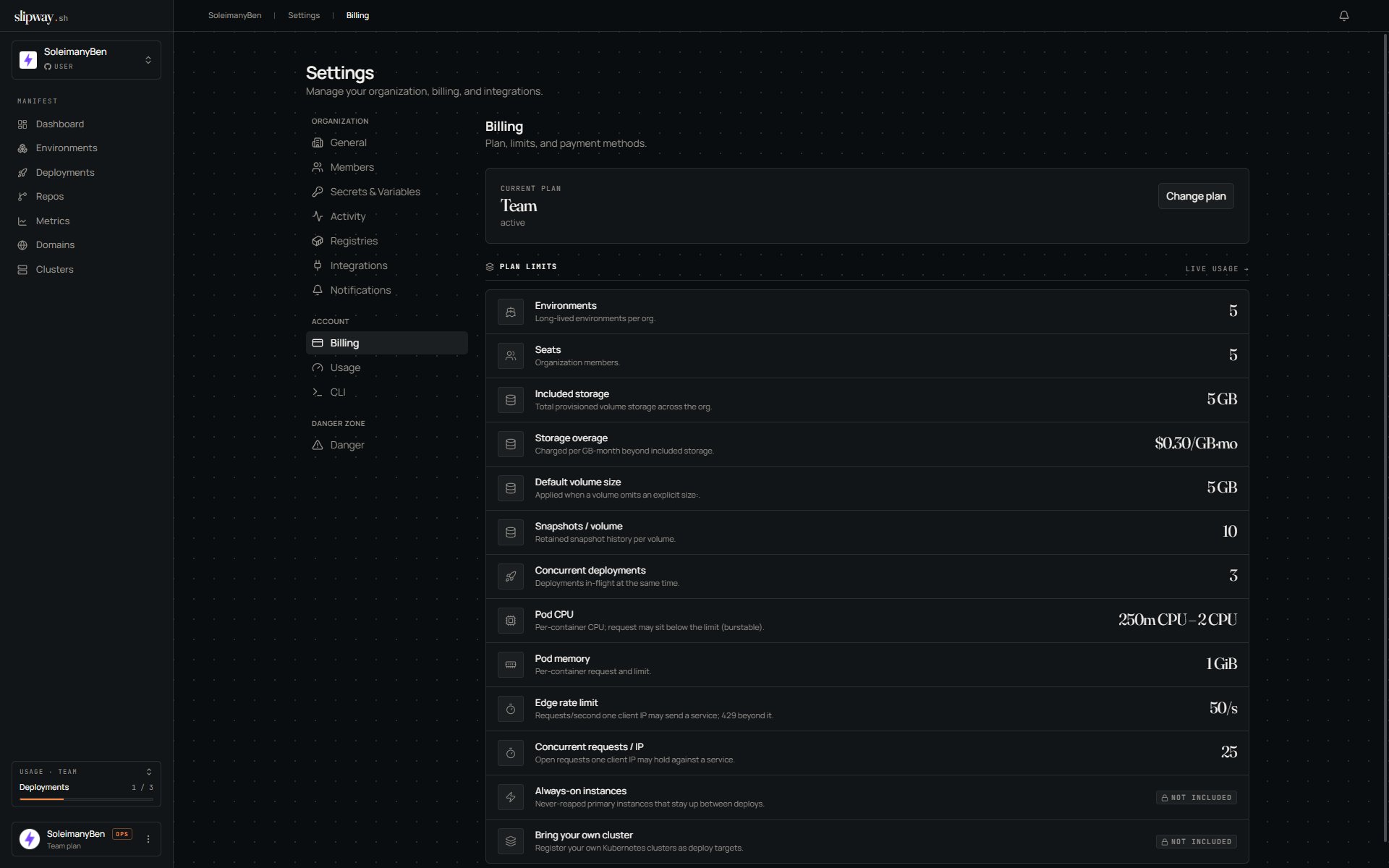
The numbers below are the standard published tiers. Your org's exact limits live on **Settings → Billing**. For current pricing, see the [pricing page on slipway.sh](https://slipway.sh/pricing).
## Start using slipway without a card
When you install the GitHub App, your org starts on a **30-day free trial**, no credit card required. Deploys, environments, and previews all work immediately; your subscription status reads `trialing` for the trial window. slipway emails the org's owners and admins to confirm the trial has started, along with the date it ends.
As the trial winds down, slipway warns the org's owners and admins by email and in the in-app inbox (3 days out, then 1 day out), and a countdown banner sits at the top of the console on every page. Add a payment method any time from **Settings → Billing** to convert to a paid plan and keep everything running without interruption.
If the trial ends with no payment method on file, slipway gives you a short grace period (a few more days, with continued warnings) and then **pauses every environment in the org**. Each one is scaled to zero, so its data and volumes are preserved but its URLs go offline, and new deploys are blocked while paused. Add billing to resume: your environments scale back up automatically.
A plan can also be configured to **require payment up front**. Selecting it sends you straight to Stripe Checkout with no card-free window. Whether a plan offers a card-free trial, and for how long, is set per plan.
## When a payment fails
The same pause mechanism covers existing paying customers. If an invoice fails, your subscription moves to `past_due`, slipway warns the owners, and after a grace period the org's environments are paused until billing is fixed. Paying the outstanding invoice resumes everything automatically. There's no manual step.
## What changes between plans
The dimensions below mirror the rows you'll see on the **Settings → Billing** page.
| Dimension | Starter | Team | Business | Enterprise |
| --------------------------------- | -------------- | -------------- | -------------- | ---------------- |
| Price / month | \$19 | \$99 | \$399 | Custom |
| Free trial | 30 days | 30 days | 30 days | Proof of concept |
| Seats (members) | Unlimited | Unlimited | Unlimited | Unlimited |
| Environments | 3 | 15 | 50 | Unlimited |
| Concurrent environments | 5 | 20 | 50 | Unlimited |
| Pods per environment | 6 | 12 | 20 | Custom |
| Pod CPU (request – burst limit) | 0.25 – 2 vCPU | 0.5 – 4 vCPU | 1 – 8 vCPU | Custom |
| Pod memory (per service) | 1 GiB | 2 GiB | 4 GiB | Custom |
| Max preview lifetime | 7 days | 30 days | Unlimited | Unlimited |
| Included storage (total, per org) | 10 GB | 50 GB | 250 GB | Custom |
| Storage overage | — (hard cap) | \$0.15 / GB·mo | \$0.15 / GB·mo | Custom |
| Default volume size (per volume) | 5 GB | 10 GB | 20 GB | Custom |
| Sleep / wake on idle | Forced, 30 min | Configurable | Configurable | Configurable |
| Always-on (primary) instances | yes | yes | yes | yes |
| Bring your own cluster (BYOK) | — | — | yes | yes |
| Org-scoped secrets | yes | yes | yes | yes |
| Custom apps domain | yes | yes | yes | yes |
| SSO / SAML | — | — | yes | yes |
| Log retention | 30 days | 30 days | 30 days | Custom |
| Support | Community | Email | Priority | Dedicated |
Features marked **—** are not included on that plan. Upgrade through **Settings → Billing** to unlock them. Custom domains (bring-your-own-zone) are not plan-gated: every plan includes unlimited custom domains. The **custom apps domain** row above is the org-wide wildcard base domain for generated URLs.
**Seats are never metered.** Every plan includes unlimited org members. Adding a teammate never changes your bill, and there is no per-developer pricing on any tier. What you pay for is environments and the compute they run.
**How "concurrent environments" is counted.** The cap counts every environment instance that exists, whatever spawned it: your always-on primary, PR previews, `sw dev` instances, and `Deploy now` manual instances all count the same. An environment with two repos counts as **one**, no matter how many components it runs. A [sleeping](/environments/lifecycle) instance still holds its slot, because it still holds its namespace, its volumes, and its URL. Close the pull request or tear the instance down to get the slot back.
**CPU request vs limit.** The pod CPU number above is the per-container **limit**, the ceiling a container may burst to. Plans set a lower CPU **request** (what's reserved on the node), so your containers run *burstable*: guaranteed the request, allowed up to the limit when the node has headroom. Memory has no such split. It's always fully reserved at the limit, because memory can't be throttled, only OOM-killed.
**Storage is an org-wide budget.** *Included storage* is the total [named-volume](/slipway-yaml/volumes) storage your whole org can use, billed on the bytes you **actually use** (not reserved size), summed across every volume. Volumes are provisioned at the plan default size above; the spec can't set a per-volume size. Volumes on a [cluster you bring yourself](/clusters/byok) live on your own storage and don't count. Track usage in the sidebar's **Usage** panel and on **Settings → Billing**.
**Storage overage.** On plans with an overage rate (Team and Business), using past your included storage is allowed and billed as metered overage, a flat per-GB-month rate added to your next invoice, rather than blocked, so you never get wedged mid-deploy. On Starter (no overage rate) included storage is a hard cap. The **Settings → Usage** page shows exactly how much you're over and the rate you'll be charged.
**Preview lifetime, not preview TTL.** Previews sleep when idle rather than dying, so the lifetime above is a backstop, not a deadline. A pull request that sits open over a weekend still has a live preview on Monday; it just scaled to zero in the meantime and wakes on the first request.
## Where you'll feel your plan
A few places in the product surface plan-derived numbers directly:
* **Sidebar usage tile.** Your current plan and one headline usage number are pinned at the bottom of the left rail on every page.
* **Settings → Billing.** Full plan details, your current usage against each limit, and the upgrade/downgrade controls.
* **Settings → Usage.** Detailed breakdowns by repo, deployment, and component over the last 30 days.
* **Deployment detail.** If a build or deploy fails because it tried to ask for more CPU, memory, or disk than your plan allows, the failure event spells out the cap that was exceeded.
## Changing plans
Open **Settings → Billing**. Upgrades take effect immediately and you're prorated for the rest of the billing period. Downgrades take effect at the end of the current period. If your usage on the lower plan would exceed its limits at that point, slipway warns you in the billing UI so you can decide what to remove first.
 ## Related
* [Members & roles](/organization/members) — who in your org can change the plan
* [Limits & defaults](/reference/limits) — the platform-wide numbers that don't depend on plan
## Related
* [Members & roles](/organization/members) — who in your org can change the plan
* [Limits & defaults](/reference/limits) — the platform-wide numbers that don't depend on plan