> ## Documentation Index
> Fetch the complete documentation index at: https://docs.slipway.sh/llms.txt
> Use this file to discover all available pages before exploring further.
# Environments
> Deploy one or more repos together as a unit, with a preview for every pull request.
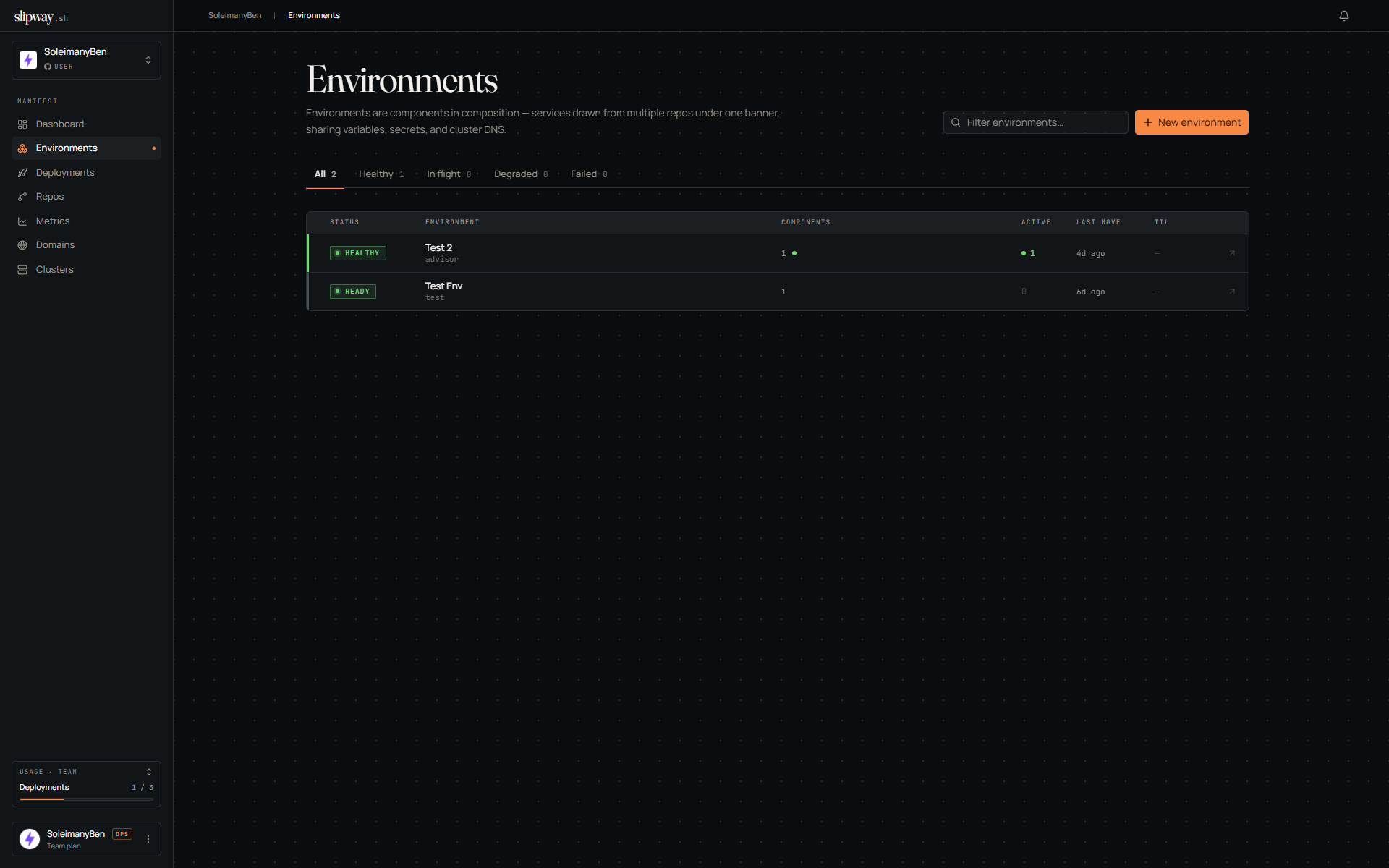
An **environment** ties one or more repos together so they deploy as a unit, share one set of variables and secrets, and can reach each other by name. Every deployment belongs to an environment.
For a single repo you rarely build one by hand: the **Deploy a repo** page creates a one-component environment for you, deploys it immediately, and turns on auto-deploy for the tracked branch. Composing several repos into one is the multi-repo path: a frontend, an API, and a worker brought up side by side.
 ## Base and instances
An environment has a long-lived **definition** (which repos take part and what ref each tracks) and one or more **instances** spawned from it:
| Instance | What it is |
| -------------- | ------------------------------------------------------------------------------------------------------------------------------------------------------------ |
| **Primary** | The always-on instance at the tracked refs — your team's stable staging URL. On by default for new environments (untick at create time for PR-only); no TTL. |
| **PR preview** | Spawned automatically when a pull request opens against a tracked ref. The PR's repo runs at its branch; siblings stay frozen. Torn down when the PR closes. |
| **Dev** | Spawned from [`sw dev up`](/cli/dev-instances) to test a branch. Kept alive by the CLI; reaped when it exits. |
| **Manual** | Spawned by **Deploy now** — a disposable copy at the latest tracked commits, on a TTL. |
The definition describes what the stack looks like; each PR or button press gets its own instance from that definition.
## Building one
The quickest route is **Deploy a repo** (dashboard or Repos page): pick a repository, keep the default branch, hit **Deploy**. It creates a single-component environment with the permanent deployment on and auto-deploy on push, and lands you on the live build.
The panel shows which spec file the deploy reads (a committed `slipway.yaml`, a docker-compose file converted on each deploy, or a slipway-managed spec). If the repo has more than one candidate — say a `slipway.yaml` plus a `docker-compose.yml`, or several compose files — a picker lets you choose, and the environment keeps deploying from the file you picked.
On plans without always-on instances, the same button still works — the deploy comes up as a disposable instance that tears down after your plan's preview lifetime instead of a permanent one. The page tells you the lifetime before you deploy, and you can deploy a fresh copy from the environment page any time.
For multi-repo or PR-only setups, open **Environments → New environment** and:
1. **Add components.** Pick the repos that take part. Each tracks `branch:main` by default; change the ref (branch, tag, or commit) per component. You can turn individual services off for a component, and set a per-component spec path for monorepos (e.g. `apps/api/slipway.yaml`).
2. **Name it.** The name and slug (immutable) identify the environment. Pick which [domain](/configuration/domains) its URLs sit under.
3. **Set variables & secrets** that should apply to this environment (these override org-scoped values). See [Secrets & variables](/slipway-yaml/secrets-and-variables).
4. **Create & deploy.** New environments default to deploying their permanent deployment as soon as they're created. Untick either box on the Settings step for a definition-only environment that runs nothing until a PR opens.
To change an environment later, reopen the composer from **Settings → General → Composition**. Adding repos, changing refs, and editing variables all flow through the same wizard; you're offered a redeploy when a change affects what's running.
**Reuse an existing environment.** Click **Clone** in any environment's header to create a new one with the same shape — components, variables, and config — retargeting each component's branch/tag as you go (a `main` environment → a `develop` one, say). Secret *values* aren't copied; re-enter them in the clone before its first deploy.
## When to disable the primary instance
The primary is an always-on instance at the environment's tracked refs: a stable URL, no TTL. It's on by default; turn it off for a pure PR-preview workflow, where nothing runs between PRs.
**Auto-deploy on push** is separate and per component: an environment created from **Deploy a repo** has it on; components added through the composer default it off, so a deploy stays pinned at its commit until you opt in or redeploy by hand.
The primary instance is [plan-gated](/organization/plans). When your plan doesn't include it the toggle is disabled with an upgrade prompt — single-repo deploys and PR previews still work on every plan.
## Talking between services
Every component of an instance runs on one shared private network, so any service can reach a sibling — even one from another repo — by its bare name (`http://api`). For this to be unambiguous, **service names must be unique across the environment**: two components can't both expose a service called `api`. A collision fails the deploy with a clear error.
For explicit wiring, reference a sibling with `${service..}` in `env:` or `build.args:`. You choose the variable name; slipway fills in the value at deploy time:
```yaml theme={"system"}
services:
web:
env:
API_URL: ${service.api.url}
API_PUBLIC_URL: ${service.api.public_url} # only when api has a public port
```
| Field | Resolves to |
| --------------- | -------------------------------------------------------------------------------------------------------------------------------------------------------------------------------------------------------------------------------------------------------- |
| `url` | `http://:` — the in-cluster URL. Use this for service-to-service calls. |
| `host` / `port` | The hostname / port on their own. |
| `public_url` | The external `https://…` URL. Use it for anything the browser or the outside world dials: frontend API calls, OAuth redirects, webhook callbacks. Browser calls between protected siblings work — see [Preview authentication](#preview-authentication). |
A reference resolves against any service in the same deployment, and — inside an environment — any service in a sibling component. If a cross-component peer hasn't had a healthy deploy yet, the reference fails with `unknown`; redeploy once the peer is up.
## Public URLs
Public services are served at:
```
https://--.
```
* `env-name` — the environment's slug (for a PR or dev instance, the parent's slug, so hosts stay short).
* `service` — the service name (or a `prefix:` you set on the port).
* `id` — a short, stable identifier for the instance. Every service in one instance shares it, and it survives redeploys; different instances (PR #21 vs #22) differ by it.
The hostname is stable across redeploys, so bookmarks and PR comments never churn.
## Preview authentication
Public URLs are open by default. The environment's **Preview auth** tab gates every public service of every instance — the permanent deployment and each PR preview — behind one or more sign-in methods:
| Method | How it works | Good for |
| ------------------------ | ------------------------------------------------------------------------------------ | ------------------------------------------------- |
| **Shared token** | One token reviewers paste once, then get a cookie. Rotate it any time. | Small reviewer pools, fast setup. |
| **GitHub org members** | Reviewers sign in with GitHub; membership of your installation's account is checked. | Access tied to team membership. |
| **Per-deployment token** | A fresh token per deployment, retrievable from its page. | Tight blast radius — one token opens one preview. |
Changes apply to live instances immediately, no redeploy. An individual instance can override the policy from its own **Auth** tab (force it on for a demo lockdown, or off to share one preview publicly).
**Protected services.** Each public service gets its own switch on the Preview auth tab. Switch one off to leave its URL open while the rest of the environment stays gated — for an API that carries its own auth, or one that takes third-party traffic like webhooks or a mobile app. An open service handles its own CORS. An instance's **Auth** tab carries the same switches as an override: flip a service there to diverge from the environment's list for that instance only, and reset to fall back to inheriting it.
**Calling a protected sibling from the browser.** Signing in on any protected host also signs you in to the instance's other protected hosts, and slipway answers CORS for requests between them — so a page on `web` can fetch from `api` while both are gated. Two things your frontend must do, because the calls are cross-origin:
```js theme={"system"}
fetch(apiUrl + '/posts', { credentials: 'include' })
new EventSource(apiUrl + '/events', { withCredentials: true })
```
Without the credentials flag the browser won't attach the sign-in cookie and the request comes back 401. And remember: `http://api` style internal names only work server-side — browser code must use the sibling's public URL (`${service.api.public_url}`).
**Deploy now** on an environment's page spawns a **manual instance** — a fresh, disposable copy with every component at the latest commit of its tracked ref, in its own isolated instance with its own URLs. It's the quickest way to see a definition-only environment running without opening a PR. Each press makes a new one; each consumes one concurrent-deployment slot and expires on a TTL (the clock starts at `healthy`). Use the instance's **Deploy latest** to bring it up to the newest commits — before you confirm it shows exactly what each tracked ref would move to *and* which variables and secrets have changed since it was deployed (variables show old → new; secret values are write-only, so a rotation shows as "rotated"), or tells you there's nothing to deploy.
## Base and instances
An environment has a long-lived **definition** (which repos take part and what ref each tracks) and one or more **instances** spawned from it:
| Instance | What it is |
| -------------- | ------------------------------------------------------------------------------------------------------------------------------------------------------------ |
| **Primary** | The always-on instance at the tracked refs — your team's stable staging URL. On by default for new environments (untick at create time for PR-only); no TTL. |
| **PR preview** | Spawned automatically when a pull request opens against a tracked ref. The PR's repo runs at its branch; siblings stay frozen. Torn down when the PR closes. |
| **Dev** | Spawned from [`sw dev up`](/cli/dev-instances) to test a branch. Kept alive by the CLI; reaped when it exits. |
| **Manual** | Spawned by **Deploy now** — a disposable copy at the latest tracked commits, on a TTL. |
The definition describes what the stack looks like; each PR or button press gets its own instance from that definition.
## Building one
The quickest route is **Deploy a repo** (dashboard or Repos page): pick a repository, keep the default branch, hit **Deploy**. It creates a single-component environment with the permanent deployment on and auto-deploy on push, and lands you on the live build.
The panel shows which spec file the deploy reads (a committed `slipway.yaml`, a docker-compose file converted on each deploy, or a slipway-managed spec). If the repo has more than one candidate — say a `slipway.yaml` plus a `docker-compose.yml`, or several compose files — a picker lets you choose, and the environment keeps deploying from the file you picked.
On plans without always-on instances, the same button still works — the deploy comes up as a disposable instance that tears down after your plan's preview lifetime instead of a permanent one. The page tells you the lifetime before you deploy, and you can deploy a fresh copy from the environment page any time.
For multi-repo or PR-only setups, open **Environments → New environment** and:
1. **Add components.** Pick the repos that take part. Each tracks `branch:main` by default; change the ref (branch, tag, or commit) per component. You can turn individual services off for a component, and set a per-component spec path for monorepos (e.g. `apps/api/slipway.yaml`).
2. **Name it.** The name and slug (immutable) identify the environment. Pick which [domain](/configuration/domains) its URLs sit under.
3. **Set variables & secrets** that should apply to this environment (these override org-scoped values). See [Secrets & variables](/slipway-yaml/secrets-and-variables).
4. **Create & deploy.** New environments default to deploying their permanent deployment as soon as they're created. Untick either box on the Settings step for a definition-only environment that runs nothing until a PR opens.
To change an environment later, reopen the composer from **Settings → General → Composition**. Adding repos, changing refs, and editing variables all flow through the same wizard; you're offered a redeploy when a change affects what's running.
**Reuse an existing environment.** Click **Clone** in any environment's header to create a new one with the same shape — components, variables, and config — retargeting each component's branch/tag as you go (a `main` environment → a `develop` one, say). Secret *values* aren't copied; re-enter them in the clone before its first deploy.
## When to disable the primary instance
The primary is an always-on instance at the environment's tracked refs: a stable URL, no TTL. It's on by default; turn it off for a pure PR-preview workflow, where nothing runs between PRs.
**Auto-deploy on push** is separate and per component: an environment created from **Deploy a repo** has it on; components added through the composer default it off, so a deploy stays pinned at its commit until you opt in or redeploy by hand.
The primary instance is [plan-gated](/organization/plans). When your plan doesn't include it the toggle is disabled with an upgrade prompt — single-repo deploys and PR previews still work on every plan.
## Talking between services
Every component of an instance runs on one shared private network, so any service can reach a sibling — even one from another repo — by its bare name (`http://api`). For this to be unambiguous, **service names must be unique across the environment**: two components can't both expose a service called `api`. A collision fails the deploy with a clear error.
For explicit wiring, reference a sibling with `${service..}` in `env:` or `build.args:`. You choose the variable name; slipway fills in the value at deploy time:
```yaml theme={"system"}
services:
web:
env:
API_URL: ${service.api.url}
API_PUBLIC_URL: ${service.api.public_url} # only when api has a public port
```
| Field | Resolves to |
| --------------- | -------------------------------------------------------------------------------------------------------------------------------------------------------------------------------------------------------------------------------------------------------- |
| `url` | `http://:` — the in-cluster URL. Use this for service-to-service calls. |
| `host` / `port` | The hostname / port on their own. |
| `public_url` | The external `https://…` URL. Use it for anything the browser or the outside world dials: frontend API calls, OAuth redirects, webhook callbacks. Browser calls between protected siblings work — see [Preview authentication](#preview-authentication). |
A reference resolves against any service in the same deployment, and — inside an environment — any service in a sibling component. If a cross-component peer hasn't had a healthy deploy yet, the reference fails with `unknown`; redeploy once the peer is up.
## Public URLs
Public services are served at:
```
https://--.
```
* `env-name` — the environment's slug (for a PR or dev instance, the parent's slug, so hosts stay short).
* `service` — the service name (or a `prefix:` you set on the port).
* `id` — a short, stable identifier for the instance. Every service in one instance shares it, and it survives redeploys; different instances (PR #21 vs #22) differ by it.
The hostname is stable across redeploys, so bookmarks and PR comments never churn.
## Preview authentication
Public URLs are open by default. The environment's **Preview auth** tab gates every public service of every instance — the permanent deployment and each PR preview — behind one or more sign-in methods:
| Method | How it works | Good for |
| ------------------------ | ------------------------------------------------------------------------------------ | ------------------------------------------------- |
| **Shared token** | One token reviewers paste once, then get a cookie. Rotate it any time. | Small reviewer pools, fast setup. |
| **GitHub org members** | Reviewers sign in with GitHub; membership of your installation's account is checked. | Access tied to team membership. |
| **Per-deployment token** | A fresh token per deployment, retrievable from its page. | Tight blast radius — one token opens one preview. |
Changes apply to live instances immediately, no redeploy. An individual instance can override the policy from its own **Auth** tab (force it on for a demo lockdown, or off to share one preview publicly).
**Protected services.** Each public service gets its own switch on the Preview auth tab. Switch one off to leave its URL open while the rest of the environment stays gated — for an API that carries its own auth, or one that takes third-party traffic like webhooks or a mobile app. An open service handles its own CORS. An instance's **Auth** tab carries the same switches as an override: flip a service there to diverge from the environment's list for that instance only, and reset to fall back to inheriting it.
**Calling a protected sibling from the browser.** Signing in on any protected host also signs you in to the instance's other protected hosts, and slipway answers CORS for requests between them — so a page on `web` can fetch from `api` while both are gated. Two things your frontend must do, because the calls are cross-origin:
```js theme={"system"}
fetch(apiUrl + '/posts', { credentials: 'include' })
new EventSource(apiUrl + '/events', { withCredentials: true })
```
Without the credentials flag the browser won't attach the sign-in cookie and the request comes back 401. And remember: `http://api` style internal names only work server-side — browser code must use the sibling's public URL (`${service.api.public_url}`).
**Deploy now** on an environment's page spawns a **manual instance** — a fresh, disposable copy with every component at the latest commit of its tracked ref, in its own isolated instance with its own URLs. It's the quickest way to see a definition-only environment running without opening a PR. Each press makes a new one; each consumes one concurrent-deployment slot and expires on a TTL (the clock starts at `healthy`). Use the instance's **Deploy latest** to bring it up to the newest commits — before you confirm it shows exactly what each tracked ref would move to *and* which variables and secrets have changed since it was deployed (variables show old → new; secret values are write-only, so a rotation shows as "rotated"), or tells you there's nothing to deploy.