> ## Documentation Index
> Fetch the complete documentation index at: https://docs.slipway.sh/llms.txt
> Use this file to discover all available pages before exploring further.
# Deployments
> How a deployment starts, what happens at each step, and how to deploy by hand.
A deployment is one attempt to bring a commit alive. Every deployment runs through the same steps and records what happened in an [event log](/deployments/watching).
 ## Lifecycle
```
queued → created, about to start.
building → each service with a build: is built; output streams into the logs.
Services using a prebuilt image: skip this step.
deploying → images are ready; services start and slipway waits for readiness.
healthy → every public service is ready and its URL is live.
```
After `healthy`, a deployment ends in one of:
| Status | When |
| ------------ | -------------------------------------------------------------------------------------- |
| `superseded` | A newer healthy deployment for the same branch took over, or an ephemeral TTL expired. |
| `cancelled` | You cancelled, or a new commit arrived for the same branch/PR mid-build. |
| `failed` | A build, image pull, healthcheck, or secret lookup failed — reason on the deployment. |
See [Statuses & events](/reference/statuses) for the full enum.
## Triggers
## Lifecycle
```
queued → created, about to start.
building → each service with a build: is built; output streams into the logs.
Services using a prebuilt image: skip this step.
deploying → images are ready; services start and slipway waits for readiness.
healthy → every public service is ready and its URL is live.
```
After `healthy`, a deployment ends in one of:
| Status | When |
| ------------ | -------------------------------------------------------------------------------------- |
| `superseded` | A newer healthy deployment for the same branch took over, or an ephemeral TTL expired. |
| `cancelled` | You cancelled, or a new commit arrived for the same branch/PR mid-build. |
| `failed` | A build, image pull, healthcheck, or secret lookup failed — reason on the deployment. |
See [Statuses & events](/reference/statuses) for the full enum.
## Triggers
 | Trigger | Source | Behavior |
| ---------------- | -------------------------- | ---------------------------------------------------------------------- |
| **Push** | Push to the default branch | Deploys only if **Auto-deploy on push** is on (off by default). |
| **Pull request** | PR opened or updated | Always builds a preview at a stable URL; torn down when the PR closes. |
| **Manual** | A button in the UI | Deploys on demand — see below. |
Every row in an environment's deploy history shows a **Triggered by** column naming who caused it, with their avatar: the person who pushed, the author of the pull request, or whoever clicked deploy. Pull-request rows link the `#` chip straight to the PR, and each row shows the branch it deployed.
### Auto-deploy on push
A repo you enable gets a managed environment that's **auto-deploy on by default** — a push to the tracked branch rebuilds it in place ("git push deploys"), cancelling any in-flight deploy for the same branch so your latest commit wins. In a **multi-repo environment** the components default to **off** (deliberate), so a push leaves the deploy pinned at the commit you deployed; turn on **Auto-deploy on push** per component (environment → Settings → General). The environment header shows an **auto-updates on push** / **pinned** chip so you can always see which behavior you're getting.
### Pull-request previews
A PR gets a stable hostname (`--.`) that stays the same across commits, so reviewers' links never break — traffic cuts over to the newest build the instant it's healthy. Slipway posts (and updates) the live URL as a [PR comment](/configuration/repositories#pr-comments). Closing the PR tears down every deployment for it. PR previews always run, regardless of the push setting.
### Manual deploys
From a repo or environment page:
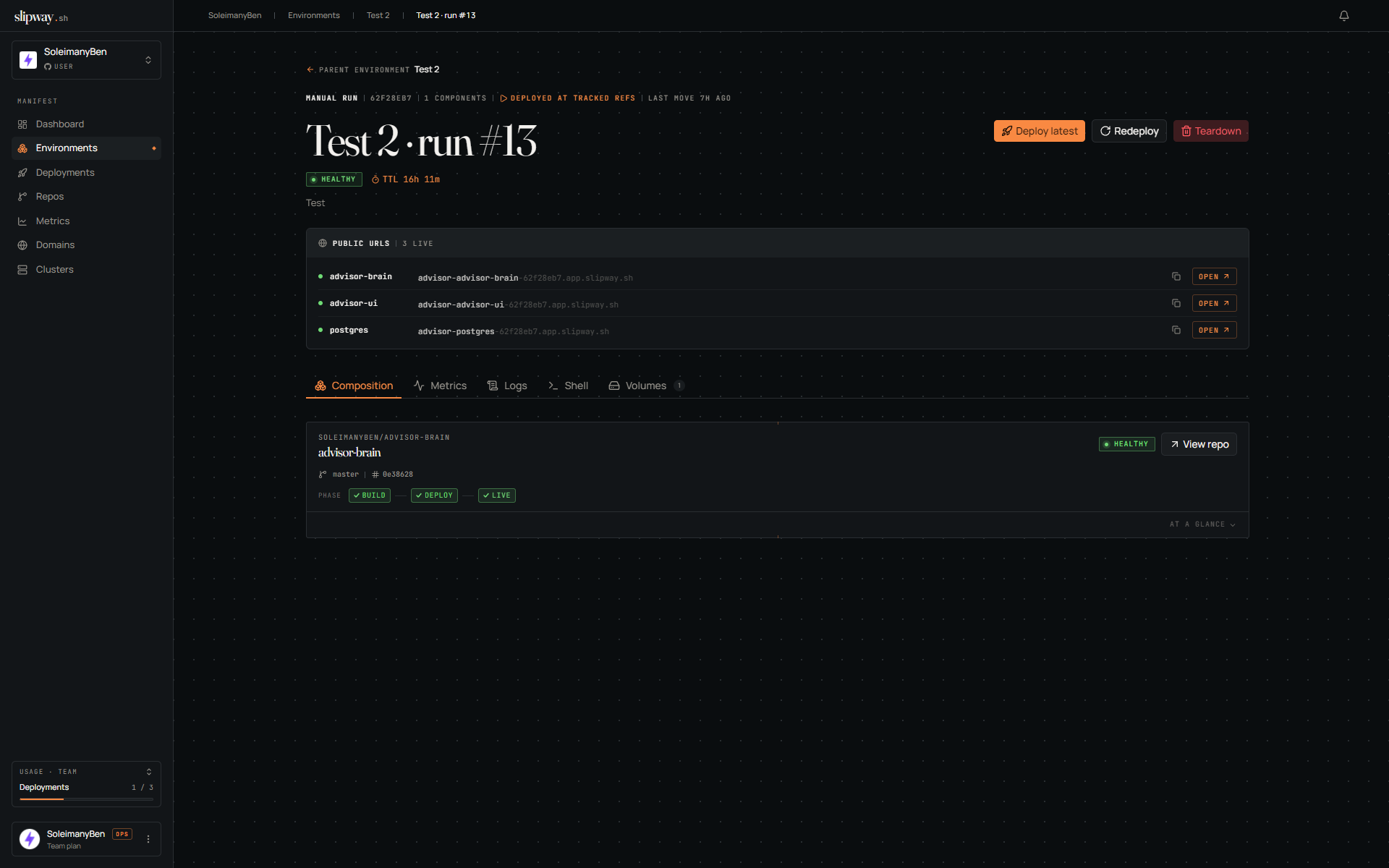
* **Deploy** — deploy the watched branch's latest commit (or an older commit on it). Persistent and pinned: it stays up until you redeploy or tear it down. Manual deploys are scoped to the default branch.
* **Redeploy** — re-run the build and deploy at the **currently-deployed** commit, on the same stable URL. Use it to pick up a changed base image or secret, or retry a transient failure.
* **Deploy now** — spin up a fresh, disposable instance at the latest commit with its own URL and TTL. The TTL clock starts at `healthy`, so a slow build doesn't eat your window.
To stand up a *different* ref — a tag or feature branch — open a pull request (a preview) or run [`sw dev up`](/cli/dev-instances) (a dev instance). Each gets its own isolated instance and URL.
## Build caching
Builds are content-addressed: the image tag is derived from the commit plus a hash of the build inputs (`context`, `dockerfile`, `target`, `args`). If an earlier deploy on the same commit produced the same inputs, slipway skips the build and reuses the cached image — so pushing a typo fix to a PR is cheap when it doesn't touch build inputs.
When a build *does* run, it reuses the layer cache from the previous build of that service, so only the layers you changed are rebuilt. That cache is shared per **repository**, not per environment: a pull-request preview inherits the warm cache from your main environment, which is why a preview's first build is fast rather than starting from zero.
### Rebuilding without the cache
Sometimes you want a genuinely clean build — a base image moved under a floating tag, or a build looks stale in a way you can't explain. On an environment, open the dropdown beside **Deploy latest** and choose **Rebuild without cache**.
That runs every build step again *and* ignores the image slipway already has for the current commit. Both parts matter: without the second, slipway would see a finished image for that commit and skip the build entirely, so nothing would change.
In an environment with several repositories, the dialog lets you pick which ones to rebuild. Cold-building every repo when only one is misbehaving costs minutes for nothing, so choose the one you're actually chasing.
The rebuild is slower by design, and it leaves a fresh cache behind for the next deploy.
## Cutover & supersession
For a public service, slipway waits for readiness, makes the URL live, and emits a `cutover` event. When a newer build for the same branch reaches `healthy`, the previous one flips to `superseded` — the hostname is stable, so traffic hands over without anyone updating a link.
## Teardown
A live deployment has a **Tear down** action. For a long-lived environment component it reclaims just that component (siblings untouched); for a preview or dev instance it tears the whole instance down. The deployment row stays in history as `superseded`.
Slipway also tears down automatically when a PR closes, when a newer deploy supersedes a branch, or when an ephemeral TTL expires (a `gc` event records it). If the platform restarts mid-deploy, that deployment is marked `failed` — redeploy it from its page.
| Trigger | Source | Behavior |
| ---------------- | -------------------------- | ---------------------------------------------------------------------- |
| **Push** | Push to the default branch | Deploys only if **Auto-deploy on push** is on (off by default). |
| **Pull request** | PR opened or updated | Always builds a preview at a stable URL; torn down when the PR closes. |
| **Manual** | A button in the UI | Deploys on demand — see below. |
Every row in an environment's deploy history shows a **Triggered by** column naming who caused it, with their avatar: the person who pushed, the author of the pull request, or whoever clicked deploy. Pull-request rows link the `#` chip straight to the PR, and each row shows the branch it deployed.
### Auto-deploy on push
A repo you enable gets a managed environment that's **auto-deploy on by default** — a push to the tracked branch rebuilds it in place ("git push deploys"), cancelling any in-flight deploy for the same branch so your latest commit wins. In a **multi-repo environment** the components default to **off** (deliberate), so a push leaves the deploy pinned at the commit you deployed; turn on **Auto-deploy on push** per component (environment → Settings → General). The environment header shows an **auto-updates on push** / **pinned** chip so you can always see which behavior you're getting.
### Pull-request previews
A PR gets a stable hostname (`--.`) that stays the same across commits, so reviewers' links never break — traffic cuts over to the newest build the instant it's healthy. Slipway posts (and updates) the live URL as a [PR comment](/configuration/repositories#pr-comments). Closing the PR tears down every deployment for it. PR previews always run, regardless of the push setting.
### Manual deploys
From a repo or environment page:
* **Deploy** — deploy the watched branch's latest commit (or an older commit on it). Persistent and pinned: it stays up until you redeploy or tear it down. Manual deploys are scoped to the default branch.
* **Redeploy** — re-run the build and deploy at the **currently-deployed** commit, on the same stable URL. Use it to pick up a changed base image or secret, or retry a transient failure.
* **Deploy now** — spin up a fresh, disposable instance at the latest commit with its own URL and TTL. The TTL clock starts at `healthy`, so a slow build doesn't eat your window.
To stand up a *different* ref — a tag or feature branch — open a pull request (a preview) or run [`sw dev up`](/cli/dev-instances) (a dev instance). Each gets its own isolated instance and URL.
## Build caching
Builds are content-addressed: the image tag is derived from the commit plus a hash of the build inputs (`context`, `dockerfile`, `target`, `args`). If an earlier deploy on the same commit produced the same inputs, slipway skips the build and reuses the cached image — so pushing a typo fix to a PR is cheap when it doesn't touch build inputs.
When a build *does* run, it reuses the layer cache from the previous build of that service, so only the layers you changed are rebuilt. That cache is shared per **repository**, not per environment: a pull-request preview inherits the warm cache from your main environment, which is why a preview's first build is fast rather than starting from zero.
### Rebuilding without the cache
Sometimes you want a genuinely clean build — a base image moved under a floating tag, or a build looks stale in a way you can't explain. On an environment, open the dropdown beside **Deploy latest** and choose **Rebuild without cache**.
That runs every build step again *and* ignores the image slipway already has for the current commit. Both parts matter: without the second, slipway would see a finished image for that commit and skip the build entirely, so nothing would change.
In an environment with several repositories, the dialog lets you pick which ones to rebuild. Cold-building every repo when only one is misbehaving costs minutes for nothing, so choose the one you're actually chasing.
The rebuild is slower by design, and it leaves a fresh cache behind for the next deploy.
## Cutover & supersession
For a public service, slipway waits for readiness, makes the URL live, and emits a `cutover` event. When a newer build for the same branch reaches `healthy`, the previous one flips to `superseded` — the hostname is stable, so traffic hands over without anyone updating a link.
## Teardown
A live deployment has a **Tear down** action. For a long-lived environment component it reclaims just that component (siblings untouched); for a preview or dev instance it tears the whole instance down. The deployment row stays in history as `superseded`.
Slipway also tears down automatically when a PR closes, when a newer deploy supersedes a branch, or when an ephemeral TTL expires (a `gc` event records it). If the platform restarts mid-deploy, that deployment is marked `failed` — redeploy it from its page.